Tumbler Lying Down Mockup: A Practical Evaluation for Designers
In the competitive landscape of product design and branding, presenting a concept effectively is often as critical as the design itself. Visualizing how a tumbler will look in a real-world setting allows stakeholders to make informed decisions before production begins. The Tumbler Lying Down Mockup addresses this specific need by offering a realistic 3D display solution. This tool is designed to help professionals showcase their designs with a high degree of fidelity, ensuring that the final presentation matches the intended aesthetic.
This evaluation explores the functionality, benefits, and practical applications of this specific mockup format. It aims to assist designers, marketers, and brand managers in determining whether this asset aligns with their workflow requirements and project goals.
Understanding the Tumbler Lying Down Mockup
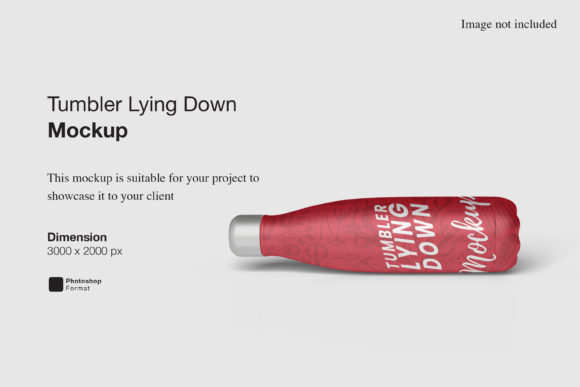
A lying down mockup differs significantly from standard upright presentations. By positioning the tumbler horizontally, the design captures a unique perspective that mimics how a product might appear on a table, counter, or in a lifestyle photography setting. This orientation highlights the curvature of the container and provides a distinct visual narrative compared to vertical shots.
The asset is delivered in PSD (Photoshop Document) format, a standard file type for professional graphic design. The core functionality relies on smart-object features. These are specialized layers within the Photoshop file that allow users to embed new images without altering the underlying texture, lighting, or shadow effects of the 3D model. When a user replaces the content, the software automatically adjusts the new design to fit the contours of the tumbler, maintaining realistic reflections and perspective distortion.
Technically, the mockup supports high-resolution output. With dimensions of 3000x2000 pixels and a resolution of 300 DPI, it is suitable for both digital displays and high-quality print materials. This resolution ensures that fine details in the artwork remain crisp, which is essential for professional portfolios and client pitches.
Key Benefits for Professional Presentation
The primary advantage of using this mockup lies in its efficiency and realism. For designers who frequently need to present multiple variations of a label or wrap, the ability to swap designs quickly is invaluable. Instead of manually warping images or recreating lighting effects for every iteration, the smart-object workflow reduces hours of work to mere seconds.
- Rapid Iteration: Designers can test color schemes, typography, and imagery instantly. This facilitates faster decision-making during the review process.
- Realistic Visualization: The 3D rendering includes accurate shadows and surface textures. This helps clients understand how the design interacts with the physical material of the tumbler.
- Customizable Backgrounds: The inclusion of changeable background colors allows the designer to isolate the product against a neutral backdrop or place it within a specific color context to match brand guidelines.
- High Resolution Output: The 300 DPI specification meets industry standards for print-ready assets, eliminating the need for upscaling which can degrade image quality.
Practical Considerations and Tradeoffs
While the Tumbler Lying Down Mockup offers significant advantages, users should be aware of certain constraints and requirements before integrating it into their workflow.
Software Dependency: The most notable limitation is the requirement for Adobe Photoshop. Users must have access to this specific software to utilize the smart-object features. If a team relies on alternative tools like Canva, GIMP, or Affinity Photo, they may find this file incompatible without conversion steps that could compromise the 3D effects.
Learning Curve for Beginners: While the included PDF help guide simplifies the process, users unfamiliar with Photoshop layers and smart objects may experience a slight learning curve. Understanding how to double-click a smart object layer to edit the source image and then save changes to update the main view is a fundamental skill required for this task.
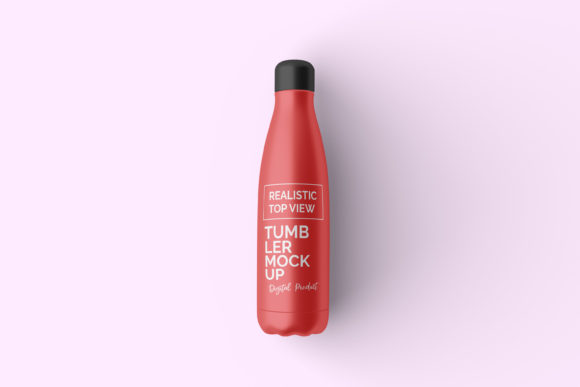
Scope of Use: The preview images provided with the download typically feature models or props that are not included in the final package. Users should expect to use the clean mockup files and apply their own backgrounds or props if needed. Relying solely on the stock photos for final deliverables is not possible; these are strictly for illustration purposes.
Ideal Use Cases
This mockup is particularly well-suited for specific scenarios where horizontal composition adds value to the presentation.
Lifestyle Marketing: Brands launching eco-friendly or reusable tumblers often use "lying down" angles to suggest relaxation, travel, or casual usage. This angle works exceptionally well for social media ads and website banners where the product needs to feel approachable rather than rigid.
Portfolio Showcasing: Graphic designers building a portfolio can use this mockup to demonstrate versatility. Showing a design in a dynamic, angled position often looks more sophisticated than a static front-facing view.
Client Presentations: When pitching a rebranding project, showing the logo or pattern wrapped around a tumbler in a realistic 3D environment helps non-designers visualize the final product. The high resolution ensures that the presentation looks professional on large monitors or when printed.
When to Consider Alternatives
Despite its strengths, this specific mockup may not be the optimal choice for every situation.
If the project requires extreme customization of the environment—such as complex lighting setups, water droplets, or specific environmental interactions—the user might benefit from a full 3D modeling suite like Blender or Cinema 4D. The Tumbler Lying Down Mockup is a pre-rendered scene; while the background color is changeable, the lighting direction and depth of field are fixed.
Additionally, if the design involves complex structural elements that wrap around the lid or handle in ways that do not conform to the standard template, the smart-object mapping might distort the artwork. In such cases, creating a custom mockup or using a different base model would be necessary to ensure accuracy.
Making the Decision
Selecting the right visualization tool depends on balancing speed, quality, and technical capability. The Tumbler Lying Down Mockup represents a strong middle ground for professionals who need high-quality results without the overhead of 3D modeling.
For teams already invested in the Adobe ecosystem, the time saved through smart-object automation justifies the investment. The 3000x2000 pixel size provides ample room for detailed work, and the ability to change background colors adds flexibility for various marketing channels.
However, if the goal is purely low-fidelity prototyping or if the team lacks Photoshop licenses, free alternatives or web-based mockup generators might be more appropriate. Conversely, if the project demands a fully interactive 360-degree view or highly stylized environments, a dedicated 3D artist might be required.
Ultimately, the decision rests on the specific requirements of the project. If the priority is to present a realistic, polished image of a tumbler design quickly and efficiently, this mockup serves as a reliable resource. It bridges the gap between a flat digital file and a tangible product, providing a clear path to professional presentation.