A4 and Cards Mockup: A Practical Evaluation for Professional Designers
In the competitive landscape of digital design, presenting a concept is often just as critical as creating it. Clients and stakeholders need to visualize how a flat layout translates into a tangible product before approving a project. This is where the A4 and Cards Mockup becomes an indispensable asset in a designer's toolkit. Rather than relying on generic screenshots or basic Photoshop overlays, this specific resource offers a realistic 3D display that elevates the perceived value of your work instantly.
The core appeal of this mockup lies in its ability to bridge the gap between abstract digital files and physical reality. Whether you are a freelancer pitching a new brand identity, a marketing agency preparing a portfolio, or a small business owner finalizing stationery, the visual context matters. The A4 and Cards Mockup provides that context without requiring advanced 3D modeling skills or expensive photography sessions. It serves as a reliable placeholder that communicates professionalism and attention to detail.
Technical Specifications and Workflow Efficiency
One of the primary considerations when selecting a digital asset is the ease of integration into existing workflows. This item is delivered in the industry-standard PSD (Photoshop) format, which ensures broad compatibility with most professional design software suites. The file structure is optimized for speed, utilizing smart-object features that allow users to replace current designs with their own within seconds. This functionality is not merely a convenience; it is a significant time-saver for professionals managing multiple projects simultaneously.
The technical specifications are robust enough to meet high-quality print requirements. The resolution is set at 300 dpi, which is the standard threshold for professional printing. With dimensions of 3000x2000 pixels, the canvas offers ample space for detailed scrutiny without compromising clarity. For those who need to present work on large screens or print proofs, this resolution ensures that text remains crisp and graphics retain their integrity. The inclusion of a PDF help guide further reduces the learning curve, providing clear instructions for navigating the layers and utilizing the smart objects effectively.
It is important to note that while the preview images serve as illustrations, they demonstrate the potential of the tool. The actual photos used in the promotional materials are not included with the purchase. Instead, the user is expected to apply their own creative content to the template. This distinction is crucial for understanding the scope of the product: it is a framework for presentation, not a finished gallery of stock photography.
Visual Realism and Presentation Quality
The effectiveness of any mockup depends heavily on its realism. A poorly rendered shadow or incorrect lighting can make a design look amateurish, regardless of the quality of the artwork itself. The A4 and Cards Mockup addresses this by offering a realistic 3D display. This implies that the perspective, depth, and lighting effects are calculated to mimic real-world conditions.
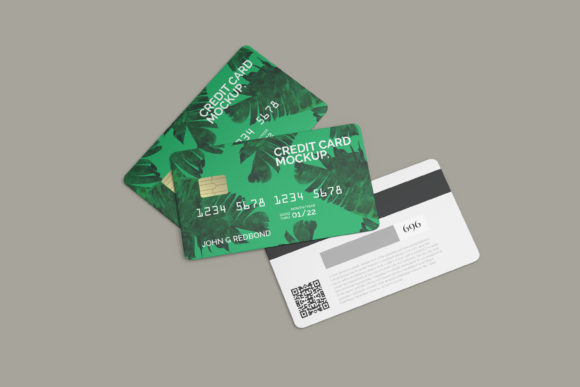
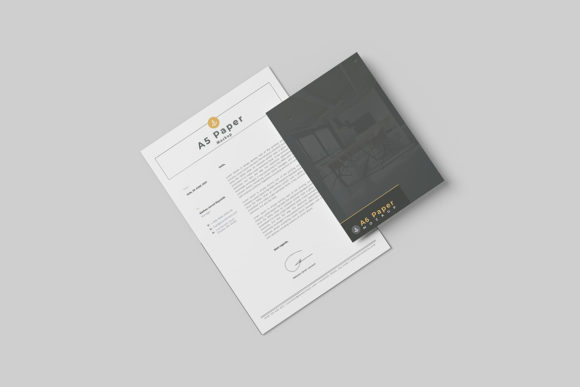
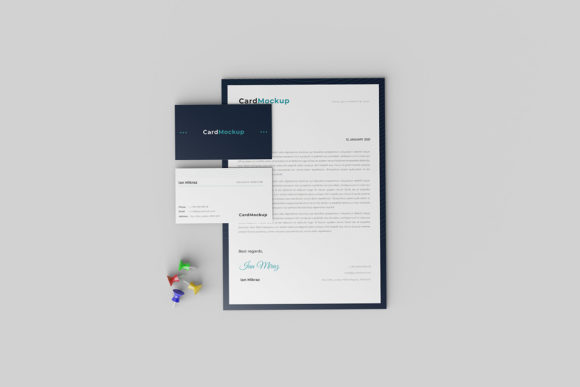
When showcasing A4 documents, such as brochures, reports, or flyers, the mockup allows the viewer to see how the paper might sit on a desk or be held in hand. Similarly, for cards—whether business cards, greeting cards, or credit card-sized vouchers—the 3D rendering adds a sense of weight and texture. This tactile quality helps clients appreciate the physical attributes of the final product, making the design feel more substantial and ready for production.
Furthermore, the feature allowing for changeable background colors adds a layer of flexibility that static mockups often lack. In a real-world scenario, a client might want to see their logo on a white business card against a neutral background, but also on a dark card to test contrast. Being able to adjust the background color within the PSD file means designers can tailor the presentation to match specific brand guidelines or mood boards without needing to create new mockup files from scratch. This consistency across different presentations reinforces the brand identity being showcased.
Target Audience and Practical Applications
This resource is particularly well-suited for a diverse range of professionals. Entrepreneurs launching a new venture will find value in using these mockups to pitch ideas to investors. A visually compelling presentation of a business card or a proposal document can significantly influence decision-making. Similarly, marketers and agencies benefit from the ability to quickly generate high-quality visuals for case studies or social media campaigns.
Freelancers and creators often wear many hats, acting as both the designer and the presenter. The efficiency gained from using smart objects allows them to focus more on the creative strategy rather than the technicalities of image manipulation. Bloggers and publishers can use these assets to illustrate articles about design trends or to showcase their own editorial layouts. Even educators teaching graphic design can utilize this mockup as a demonstration tool to show students how to prepare files for print.
The versatility extends to various project types. A small business owner designing a loyalty program could use the card mockup to visualize the membership card. A publisher could use the A4 section to display a book cover or a magazine spread. The key is the adaptability of the template to different shapes and sizes while maintaining a cohesive look. However, users should be aware that the mockup is designed for specific aspect ratios typical of A4 and standard card sizes. Attempting to force non-standard dimensions may result in distortion, so adhering to the intended size parameters is essential for maintaining the 3D integrity.
Limitations and Strategic Considerations
While the A4 and Cards Mockup is a powerful tool, it is not a universal solution for every scenario. Its reliance on Photoshop means that users must have access to this specific software. While widely available, it does exclude those working exclusively in free alternatives like GIMP or Canva without complex workarounds. Additionally, the static nature of the PSD file means it cannot replicate dynamic interactions or video animations. If a project requires a moving presentation, this tool would need to be supplemented with other assets.
Another consideration is the level of customization required. While the background color is changeable, the underlying texture and lighting of the mockup itself are fixed unless the user possesses advanced editing skills to alter the render. For some, this limitation is acceptable given the time saved. For others seeking hyper-realistic or highly stylized environments, the default rendering might feel too generic. In such cases, the mockup serves best as a starting point that can be refined further.
Reliability is another factor to weigh. Since the file relies on smart objects, corruption of the linked layers can occasionally occur if the file is moved incorrectly or if the source images are missing. Users should ensure they keep the original PSD and associated folders together. Regular backups of the workflow are always recommended. Despite these minor caveats, the overall utility of the tool remains high for its intended purpose.
Long-Term Value and Conclusion
Evaluating the long-term value of a digital asset involves looking beyond immediate cost savings. The A4 and Cards Mockup offers a sustainable return on investment by streamlining the presentation phase of the design process. By reducing the time spent on formatting and rendering, professionals can allocate more resources to research, strategy, and creative development. This shift in focus can lead to higher quality outcomes and increased client satisfaction.
The consistent application of this mockup across different projects also builds a recognizable style in a designer's portfolio. When clients see a uniform, high-quality presentation across various case studies, it instills confidence in the designer's reliability and organizational skills. This consistency is a hallmark of professional practice and can be a deciding factor in securing repeat business.
Ultimately, the decision to use this mockup depends on the specific needs of the project and the user's technical comfort level. For those who prioritize efficiency, realism, and professional presentation, the A4 and Cards Mockup represents a practical and effective solution. It transforms simple digital files into compelling visual narratives, ensuring that the hard work put into the design receives the recognition it deserves. By integrating this tool into your workflow, you align yourself with industry standards and enhance the overall impact of your creative output.