Wine Bottle Mockup: A Practical Guide to Professional Label Design
In the competitive world of beverage branding, first impressions are everything. When a consumer picks up a bottle from a shelf or scrolls through an online boutique store, they do not just see a product; they experience a brand. For designers, business owners, and creators, the ability to present a wine label in a realistic, high-quality context is crucial for gaining client approval and making marketing decisions. This is where a Wine Bottle Mockup becomes an indispensable tool in the creative workflow.
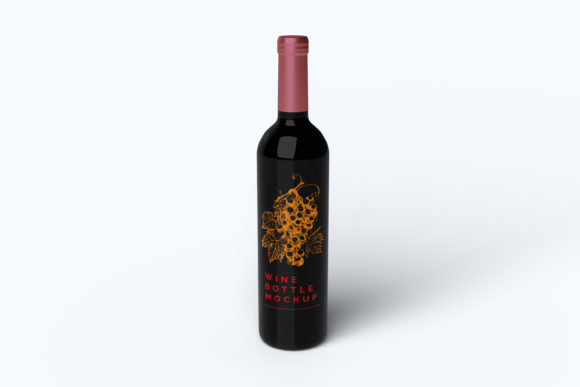
This resource is specifically designed to showcase your designs professionally in a realistic 3D display. It bridges the gap between a flat digital file and a tangible product, allowing you to visualize how your artwork will look when printed on glass. By replacing the design easily and quickly using smart-object features, you can iterate through concepts without needing advanced 3D modeling skills or expensive photography setups.
The Core Value of Realistic Visualization
One of the most significant challenges in packaging design is predicting how a flat graphic will wrap around a curved surface. A logo that looks perfect on a computer screen might appear distorted or lose its impact when applied to a cylindrical bottle. A professional Wine Bottle Mockup solves this problem by simulating real-world lighting, shadows, and perspective.
When you utilize a mockup with smart-object features, you are essentially placing your design onto a pre-rendered, photorealistic canvas. The software automatically maps your image to the contours of the bottle, ensuring that highlights and reflections align correctly. This level of realism is vital for several reasons:
- Client Confidence: Clients can see exactly what the final product will look like before any physical prototypes are manufactured.
- Error Reduction: You can spot alignment issues, color shifts, or text legibility problems early in the process.
- Marketing Impact: High-quality visuals are essential for social media campaigns, crowdfunding pages, and e-commerce listings.
The item is suitable to showcase your designs professionally because it eliminates the guesswork. Instead of sending a client a JPEG of a flat label, you provide them with an immersive visual experience that conveys the texture and weight of the actual product.
Technical Specifications and Usability
Understanding the technical capabilities of the tool is essential for integrating it into your daily workflow. The Wine Bottle Mockup is available in PSD Photoshop format, which is the industry standard for raster graphics editing. This format ensures maximum compatibility with the tools most professionals already use.
The file comes with a robust set of specifications designed for high-output quality:
- Resolution and Size: The mockup is provided at a massive 3000x2000 px size with a resolution of 300 dpi. This ensures that even if you need to print large banners or posters featuring your design, the image remains crisp and free from pixelation.
- Smart-Object Workflow: The core feature is the ease of use with Smart-Objects. These allow you to replace the current designs with your own within seconds. You simply double-click the layer, paste your artwork, save, and close. The mockup updates instantly, maintaining all lighting and shadow effects.
- Customizable Backgrounds: Flexibility is key in design. The mockup includes changeable background-color options. Whether you want a stark white studio look, a dark moody atmosphere, or a specific brand color to match your identity, you can adjust the backdrop to suit your presentation needs.
For those who may be new to the interface, a PDF help guide is included. This document provides step-by-step instructions on how to navigate the layers and utilize the smart-object functionality effectively. It serves as a quick reference to ensure you can get started immediately without frustration.
Who Benefits from Using This Tool?
While the primary users of a Wine Bottle Mockup are graphic designers, the utility extends far beyond the design studio. Various stakeholders in the beverage industry can leverage this asset to streamline their operations and improve communication.
Graphic Designers and Agencies rely on these tools to deliver premium presentations. When pitching a rebranding project to a winery, showing a realistic render demonstrates professionalism and attention to detail. It allows designers to experiment with different label variations—perhaps testing a gold foil effect against a matte finish—without committing to costly printing runs.
Small Business Owners and Winemakers often lack the budget for professional photo shoots. Creating a custom mockup allows them to create their own marketing materials, such as website hero images, Instagram posts, and email newsletters. They can visualize their brand identity in action, helping them make informed decisions about packaging before investing capital.
E-commerce Sellers benefit significantly from the ability to generate consistent product imagery. In an online marketplace, customers cannot touch the product. High-fidelity mockups fill this sensory gap, building trust and reducing return rates by setting accurate expectations regarding the product's appearance.
Real-World Applications and Scenarios
To understand the practical value, consider a few scenarios where this tool transforms a project:
Imagine a startup launching a limited-edition vintage wine. The founder has a great concept but no photos. By using the Wine Bottle Mockup, they can place their digital label onto a realistic bottle, adjust the background to match the vineyard's aesthetic, and immediately launch a Kickstarter campaign. The result is a credible campaign page that attracts backers.
Consider a freelance designer working with a large winery. The client wants to test three different label colors for the upcoming harvest season. Without a mockup, the designer would have to wait for physical proofs, which takes weeks. With the mockup, the designer can swap out the label colors in minutes, presenting three distinct options to the client for immediate feedback. This agility speeds up the approval process and saves money on unnecessary prints.
Evaluating Suitability for Your Needs
Before incorporating a Wine Bottle Mockup into your project, it is important to evaluate its suitability. While these tools are powerful, they are not a replacement for every aspect of production. Understanding their strengths and limitations helps manage expectations.
Strengths: The primary advantage is speed and cost-effectiveness. You can generate hundreds of variations of a design in a fraction of the time it takes to photograph physical products. The ability to change the background color and lighting conditions offers creative control that is difficult to achieve in a physical studio without extensive equipment.
Limitations and Considerations: It is crucial to remember that a mockup is a simulation. While modern rendering techniques are highly advanced, they may not perfectly replicate the subtle imperfections of hand-crafted bottles or specific printing textures like embossing or spot UV coating. If your project requires a hyper-realistic representation of a specific texture (e.g., heavy paper stock or unique glass refraction), a physical prototype may still be necessary for the final approval.
Additionally, the photos used in the preview are not included; they are there for illustration purposes only. This means you must work with the provided template to create your own unique assets. However, the flexibility of the smart-object system ensures that once you master the workflow, the possibilities are endless.
Conclusion
In the digital age, the presentation of a product is just as important as the product itself. A Wine Bottle Mockup offers a practical, efficient, and professional solution for visualizing label designs. By combining high-resolution output (3000x2000 px at 300 dpi) with user-friendly smart-object technology, it empowers creators to bring their ideas to life with minimal friction.
Whether you are a seasoned agency looking to impress a major client or a small business owner trying to launch your first vintage, this tool provides the foundation for success. It allows you to focus on the creativity of your design while leaving the technicalities of visualization to the software. With the included PDF help guide and customizable features, you have everything you need to produce stunning, realistic displays of your work.
Ultimately, the goal is to communicate your vision clearly. By using a realistic 3D display, you eliminate ambiguity and ensure that everyone involved—from the designer to the end consumer—is seeing the same, compelling image. As you move forward with your projects, consider how integrating this mockup into your workflow can elevate the quality of your presentations and the effectiveness of your branding strategy.