Minimalist Card Holder Mockup V4 for Professional Design
Presenting a business card design is rarely about the physical paper itself; it is about the first impression you make before a single word is read. In a digital-first world, potential clients and collaborators often encounter your work long before they hold it in their hands. This is where Minimalist Card Holder Mockup V4 becomes an essential tool for anyone looking to elevate their brand presentation. It transforms flat files into tangible, realistic 3D displays that communicate quality and attention to detail.
Whether you are a freelancer pitching a new identity or a marketing team finalizing a rebrand, the way you visualize your product matters. A generic screenshot of a design file lacks depth and context. By using this mockup, you provide stakeholders with a clear vision of how the final product will look in real life, bridging the gap between digital creation and physical reality.
Streamlining Your Workflow with Smart-Objects
One of the most frustrating aspects of creating presentations is the technical hurdle of editing complex files. Many designers waste valuable time struggling with layers, masks, or incompatible formats. Minimalist Card Holder Mockup V4 addresses this friction by leveraging smart-object features within the PSD Photoshop format. This technology allows you to replace current designs with your own creations within seconds, without compromising the lighting, shadows, or texture of the holder.
The process is designed for efficiency. You simply open the file, double-click the smart object layer containing your artwork, paste your design, save, and close. The mockup automatically updates, wrapping your design around the contours of the card holder with perfect perspective. This capability is particularly beneficial for professionals who need to iterate quickly. For example, if a client requests three different color variations for a corporate identity, you can generate all three options in minutes rather than hours.
Why Speed Matters in Creative Decisions
In competitive environments, time is a critical resource. When you are working on tight deadlines or managing multiple projects, the ability to swap out designs rapidly changes the dynamic of your workflow. Instead of focusing on the mechanics of rendering, you can focus on the creative strategy. This tool supports goals related to increased efficiency and improved presentation, allowing you to spend more time refining the actual design elements rather than wrestling with software limitations.
Enhancing Communication Through Realistic Visualization
Communication gaps often occur when clients struggle to imagine a two-dimensional layout as a three-dimensional object. They might love the typography but worry about how it looks on a curved surface or under specific lighting conditions. This item is suitable to showcase your designs professionally in a realistic 3D display, effectively solving this communication barrier.
When you present a high-fidelity mockup, you are not just showing a logo; you are telling a story about the tactile experience of the product. The realistic rendering helps stakeholders understand the weight, finish, and overall aesthetic of the card holder. This clarity reduces the number of revision rounds required because the visual feedback is immediate and accurate. It simplifies decisions by making abstract concepts concrete.
Practical Applications for Different Professionals
- Branding Agencies: Use the mockup to demonstrate brand consistency across various collateral during pitch meetings.
- Freelance Designers: Create compelling portfolio pieces that show your work in context, increasing perceived value.
- Small Business Owners: Visualize your own business cards before committing to a print run, ensuring the design meets your expectations.
- Marketers: Generate social media assets that highlight the premium nature of your services through professional imagery.
For educators and bloggers, these visuals serve as excellent examples when teaching design principles or writing articles about branding trends. The ability to create custom illustrations helps support content goals and strengthens engagement with audiences who appreciate high-quality visual aids.
Technical Specifications and Customization Options
While ease of use is paramount, the technical quality of the output determines whether the final image holds up to scrutiny. Minimalist Card Holder Mockup V4 comes with a resolution of 3000x2000 pixels at 300 dpi. This ensures that your images remain crisp and sharp, even when printed or displayed on large monitors. High-resolution files are crucial for maintaining credibility; pixelated images can undermine the professionalism of your work instantly.
Beyond resolution, the flexibility of the background is a standout feature. The mockup includes changeable background-color capabilities, allowing you to match any environment or mood. Whether you need a stark white background for a clean e-commerce listing or a dark, moody tone for a luxury brand presentation, you have full control over the setting. This adaptability means you do not need to purchase multiple mockups for different scenarios; one file serves diverse needs.
To assist users who may be less familiar with advanced Photoshop techniques, a PDF help guide is included. This resource provides step-by-step instructions, ensuring that even hobbyists or those new to digital design can achieve professional results without frustration. The inclusion of such documentation reflects a commitment to user success and accessibility.
Understanding the Scope of the Product
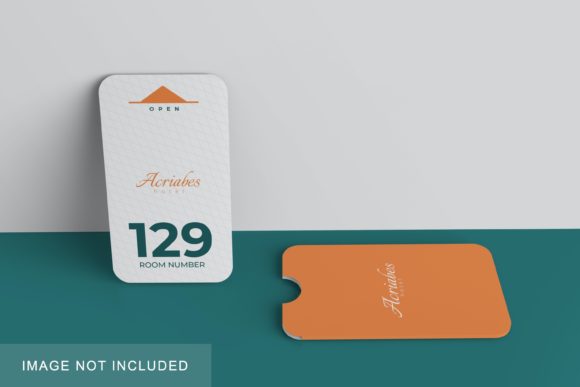
It is important to note that photos used in the preview are not included, serving only for illustration purposes. Users should understand that the mockup provides the structure and environment, while the design content is entirely up to them. This distinction empowers creators to maintain ownership of their intellectual property while utilizing a robust framework for display. However, this also means that users must have their own design assets ready to insert, which requires a baseline level of design proficiency.
Evaluating Fit and Potential Limitations
No single tool fits every situation perfectly. While Minimalist Card Holder Mockup V4 offers significant advantages, it is designed specifically for minimalist aesthetics. If your project involves highly textured, ornate, or non-standard card holders, the clean lines of this mockup might not align with your vision. In such cases, comparing options to find a mockup with more intricate detailing might be necessary.
Additionally, the requirement for Adobe Photoshop is a consideration for some users. Those who rely solely on free or web-based editors may find the PSD format limiting unless they are willing to invest in the software. However, for the vast majority of professionals and serious hobbyists, the power of smart objects outweighs this barrier. The trade-off between accessibility and functionality is generally favorable for this type of high-end deliverable.
Furthermore, while the background is changeable, the lighting and shadow physics are fixed to the base image. While this ensures realism, it limits the ability to simulate extreme environmental changes, such as placing the card holder in direct sunlight versus deep shade. Users needing to test designs under varied lighting conditions should be aware of this constraint.
Integrating the Mockup into Your Creative Process
To get the most out of this resource, integrate it early in your design process. Do not wait until the final stage to visualize your work. By testing your designs against the mockup throughout the iteration phase, you can spot issues with contrast, alignment, or scale that might be invisible on a flat screen. This proactive approach supports creativity by providing immediate, realistic feedback.
Consider using the 300 dpi resolution to prepare assets for both digital and print use. You can export the final mockup for email signatures, website headers, or printed brochures. The versatility of the file format allows it to act as a central hub for your brand's visual identity materials. By standardizing your presentation style, you strengthen communication with clients and partners, fostering trust and confidence in your expertise.
Ultimately, the goal of any designer is to convey their vision clearly and effectively. Minimalist Card Holder Mockup V4 provides the platform to do exactly that. It removes technical obstacles, enhances visual storytelling, and saves time, allowing you to focus on what truly matters: creating exceptional work. Whether you are presenting to a boardroom or sharing on social media, the difference between a flat file and a realistic 3D display can be the deciding factor in how your work is received.