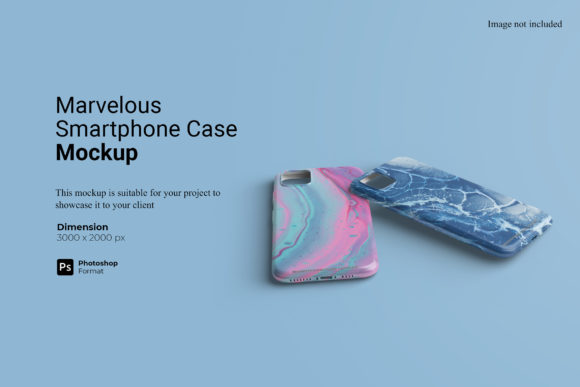
Marvelous Smartphone Case Mockup: A Practical Tool for Modern Creators
In the digital marketplace, your product is often judged by its presentation before a single unit is manufactured. For designers, entrepreneurs, and small business owners, this means that high-quality visuals are not just a nice-to-have; they are a critical component of sales and brand identity. The Marvelous Smartphone Case Mockup addresses this need directly by offering a realistic 3D display environment where your designs can shine. Unlike flat images or generic templates, this tool allows you to showcase your artwork in a way that feels tangible, helping potential customers visualize exactly what they are buying.
Why Realistic Visualization Matters in 2024
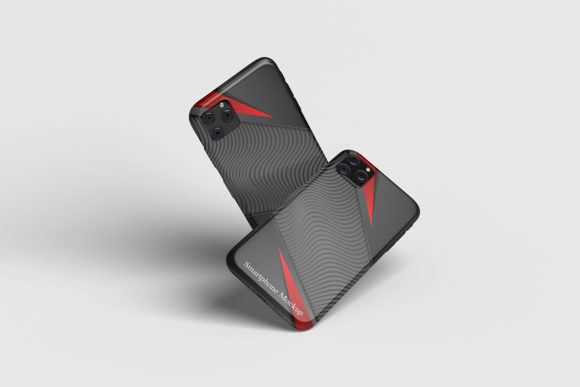
When you launch a new phone case design, whether it is a custom pattern for a boutique brand or a personal project for a portfolio, the gap between your imagination and the customer's perception can be wide. People cannot touch a screen. They rely entirely on visual cues to gauge quality, texture, and fit. This is where the specific capabilities of the Marvelous Smartphone Case Mockup become invaluable. By utilizing smart-object features within Photoshop, you can replace current designs with your own creations within seconds, maintaining perfect perspective and lighting.
This isn't about creating a fancy image for the sake of it. It is about reducing friction in the decision-making process. When a client sees a mockup that looks like a photograph taken in a professional studio, their confidence in your work increases. They stop wondering if the colors will look right or if the design will distort around the camera cutouts. The mockup handles those technical details, allowing you to focus on the creative strategy behind the design.
Real-World Applications for Diverse Users
The utility of this PSD file extends far beyond a single use case. Its versatility makes it suitable for a wide range of professionals and hobbyists who need to communicate ideas effectively. Let's look at how different people integrate this tool into their daily workflows.
Freelance Designers and Agencies
For a freelancer pitching to a client, time is money. You might have a brilliant concept for a travel-themed phone case series, but explaining it over a video call can be tedious. Instead, you can quickly generate a set of presentations using the Marvelous Smartphone Case Mockup. Because the file includes a changeable background-color feature, you can instantly switch from a neutral white backdrop to a vibrant lifestyle scene without needing complex compositing skills. This speed allows you to present multiple variations to a client during a meeting, making the pitch dynamic and interactive.
E-commerce Entrepreneurs
If you are running an online store selling custom cases, your product listings need to stand out against competitors. Using high-resolution images (3000x2000 px) at 300 dpi ensures that when a customer zooms in on your website, they see crisp details, not pixelated blobs. You can create consistent imagery across your Shopify, Etsy, or Amazon storefronts. Imagine listing a "Minimalist Geometric" collection; you can apply your vector files to the mockup, adjust the background to match your brand aesthetic, and upload a gallery that looks professionally shot, even if you only have a smartphone and natural light.
Content Creators and Bloggers
Blogger and educators often need to illustrate concepts related to mobile technology, app development, or graphic design trends. Generic stock photos can feel impersonal or outdated. By using this mockup, you can insert your own screenshots or design elements to create unique featured images for your articles. If you are writing a tutorial on color theory, you can show how a specific palette looks on a device frame. This adds a layer of authenticity to your content that engages readers more deeply than standard stock imagery.
Hobbyists and Small Business Owners
You don't need to be a corporate entity to benefit from professional tools. Many individuals start businesses as side hustles, printing designs on demand. Before investing in a large batch of inventory, you can test the waters. Create mockups of your top five designs, share them on social media, and gauge interest through likes and comments. This market research method is low-risk and highly effective. The PDF help guide included with the download ensures that even if you are new to Photoshop, you can navigate the smart-object layers without frustration.
Navigating the Technical Features
While the marketing copy often highlights "easy to use," understanding the practical implications of the features is what truly helps. The 300 DPI resolution is not just a number; it guarantees print-ready quality for physical portfolios or high-definition web displays. The smart-object architecture is the backbone of efficiency. In traditional editing, warping an image to fit a curved surface requires hours of manual masking. Here, you simply double-click the layer, paste your design, save, and watch it wrap perfectly around the case curves.
Consider the scenario of a designer working on a limited-edition drop. They need to create promotional assets for Instagram Stories, Facebook ads, and email newsletters. With the Marvelous Smartphone Case Mockup, changing the background color allows for rapid adaptation to different platform requirements. A dark mode story gets a black background; a bright summer campaign gets a sunny outdoor tone. All of this happens within the same file structure, saving you from managing dozens of separate documents.
What to Consider Before You Start
Before downloading or purchasing, it is important to have realistic expectations about the workflow. First, ensure you have Adobe Photoshop installed, as this is a PSD format file. While the PDF guide is helpful, having basic familiarity with layers and smart objects will make the experience seamless. Second, remember that the photos used in the preview are for illustration purposes only. You will be bringing your own creativity to the table. The mockup provides the stage, but you provide the performance.
Additionally, think about your output needs. Are you targeting mobile users primarily? The 3000x2000 px size is ample for desktop viewing, but you may want to crop the images specifically for mobile feeds after generating them. The flexibility of the smart objects means you can create one master file and export various sizes without losing quality. Finally, consider the context of your brand. Does the clean, professional look of this mockup align with your aesthetic? If your brand is gritty and raw, you might prefer a different style, but for most modern, sleek brands, this tool offers the ideal balance of realism and polish.
Maximizing Your Creative Potential
Ultimately, the goal of any design resource is to amplify your voice, not obscure it. The Marvelous Smartphone Case Mockup serves as a bridge between your digital canvas and the real world. Whether you are a marketer trying to sell a service, an educator demonstrating a concept, or a hobbyist sharing your art, the ability to present your work in a realistic 3D display elevates your professionalism. It removes the guesswork from visualization and replaces it with clarity.
By integrating this tool into your routine, you streamline your production pipeline. You spend less time fiddling with lighting and shadows and more time refining your designs. The result is a portfolio that commands respect, product listings that convert, and a workflow that feels effortless. In a crowded digital landscape, standing out often comes down to the quality of your presentation, and this mockup provides the foundation you need to build a compelling visual story.